Eleventy in a Box
A premium Eleventy starter kit for designers and developers who want to spend less time setting up the same project structure and more time designing distinctive websites.
Here’s a quick design tip for making headlines more interesting using text-decoration.
I really enjoy thumbing through print magazines and finding inspiration for making my typographic designs more interesting. I can’t remember the last time I saw the CSS text-decoration property used online for anything other than hyperlinks. But, text-decoration and related properties can be used on other text elements too. Here’s the design I’m making:
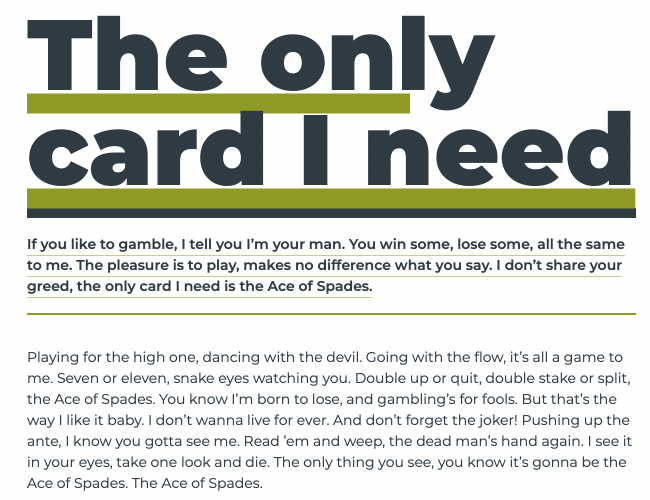
The headline has a thick, offset green underline. The standfirst paragraph which follows it also has an offset underline plus a thicker top border. These offsets are simple to apply, starting with that headline:
h1 {
text-decoration-color: var(--color-accent);
text-decoration-thickness: 10px;
text-decoration-line: underline;
text-underline-offset: 3px; }
Unsurprisingly, the text-decoration-line property sets the type of decoration on any text element. There are several value options including line-through, overline, and underline.
Whereas in the past the colour of a text-decoration always matched the current colour of the text, today there’s the text-decoration-color property to change that. For this design, I set the decoration colour from the default blue/grey to my green accent:
h1 {
text-decoration-color: var(--color-accent); }
A thick underline adds extra impact to my headline, so I change the thickness of that decoration to 20px which matches the weight of the headline text:
h1 {
text-decoration-thickness: 20px; }
The text-underline-offset property sets the distance from a decoration line’s default position which can be especially useful for fine-tuning the look of hyperlinks and my headline. I position this underline 3px lower than its default position:
h1 {
text-underline-offset: 3px; }
These text-decoration and text-underline-offset properties—combined with tight leading—turn an uninteresting looking headline into a design element which feels considered and intentional.
This headline looks even better when combined with a standfirst paragraph which shares some of the same styles. First, I add thick top and thin bottom borders, plus a little padding:
h1 + p {
padding: 1rem 0;
border-top: 10px solid var(--color-dark);
border-bottom: 2px solid var(--color-accent); }
I add a hairline width underline and offset the decoration so it fits neatly between my lines of text:
h1 + p {
text-decoration-color: var(--color-accent);
text-decoration-line: underline;
text-decoration-thickness: .5px;
text-underline-offset: 6px; }
I’ve long been of the opinion that every text element can be an opportunity to add interest to a design and this is especially true of headlines. It’s also true that typographic design doesn’t stop with choosing a typeface and that simple techniques like this can help make a design more special.
Here’s this headline design on CodePen for you to experiment with.
A premium Eleventy starter kit for designers and developers who want to spend less time setting up the same project structure and more time designing distinctive websites.
Contract Killer is plain and simple and there’s no legal jargon. It’s customisable to suit your business and has been used on countless web projects since 2008.
Free compound grid and modular grid layout generators, plus a set of HTML/CSS layout templates you can call on to make more interesting layouts, available to buy.